Pages

Friday, August 29, 2008

Browser

Got this web application that I am going to deploy to production next week, I run through its functionality on different browser, to ensure the its function and look & feel wont break up. Found out that there are minor different in each browser like the function getElementByID(), Mozilla wont recognized if we just provide the properties "name" of the object we should used "id" too, and its likely kind of redundant thing but what else I can do, have no choice i dont know what browser may the user prefer to used with. Also found out that the in Safari the muti-box can be expand and shrink its default size just by dragging its lower right portion of the box, and its seems like the whole page will then deform. though its a cool functionality but it can deform the elements of the page. Anyway the web apps is pretty stable on MS Internet Explorer.

Thanks to Firebug plug-in from mozilla and Microsoft Debugger Debugger it can really ease for finding objects and elements on the page. I like firebug feature of its mouse over feature on the script and the elements on the pages will then get highlighted, this is a good visual debugger. On Safari on the other hand, there is no plug-in or add-on that you can download and incorporate, there is one somethimes they called the logger that you are going to run on Mac OS terminal and that if you are using mac. Enabling debugger on Safari is a bit tricky, and I think the trick also differ on each versions. I am using version 3.1.2(525.21) on windows XP SP2. below is the step to enabled it.

Enabling Safari 3.1.2 on(525.21) debugger on Windows XP

1. goto your document and setting profile. like below directory, take note the {username} you must replace that in your own default username.

C:\Documents and Settings\{username}\Application Data\Apple Computer\Safari\Preferences

2. Open the file "com.apple.Safari.plist" on your favorite editor.
3. The file is content is written on XML. The file is the configuration of the Safari itself.
4. add the script below at the bottom of the script,
just before or above the closing tag "</dict>"

<key>IncludeDebugMenu</key>
<true/>

5. Save the file and restart the Safari browser.
6. Inspect the Safari menu you will now see the menu name Develope.
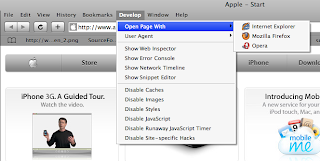


7. Done. pretty tricky right.


And of course I am using the Netbeans IDE 6.5 development version, its new feature plugin /addons for browser on mozilla and IE7 called Netbeans Javascript Debugger really help a lot. I hope there will be also soon on Safari and Opera. I have also a tool that one of my colleague on netcat gave me called dbmon.exe, it traces the browser engine footprints, what its currently doing.

So end up my day with a cool browser engine handling war conflict. heheheh. its fun then.

Thursday, August 21, 2008

Move the needle!


Today I received email from NetBeans marketing, they officially accepted me to their "Move the needle" program, this is kinda of guiding you to the download page of netbeans. Helping the netbeans community grow and inspire developer to use the IDE. So to all Java army out there, try the new hot NetBeans 6.5, this version will totally Rocks  your world inside and out(hehehe). Its kinda a very nice piece of arts...  


so what your waiting for grab it, its open source totally 100% free for software design and development.

so here we go go move the needle.... 


Created with NetBeans!

Happy NetBeaning...

Tuesday, August 19, 2008

NB65 JavaScript Debugger

I end up this day working with JavaScript, working on JavaScript pretty easy now a days on NetBeans 6.5, the IDE will generate [r/o] or readonly jsp files if im not mistaken from the current pages the browser is loading, it automatically shows all the import javascript(.js) and uri the pages it uses like the one you see if your are going to right-click the web pages and see the view source file, and the good thing is it is inside the IDE, the IDE generate the web source pages with proper indention, Editor color coding feature. You can used the CTRL+Shift+F the generated jsp to make more the tag more readable and properly formatted. This nb65 JavaScript feature also needs the browser default or native if you prefer Script Debugger. Im using Internet Explorer 7(ie7) . So I need to install first the Script Debugger from microsoft before I can used this feature. you can find the MS Script debugger in this link http://www.microsoft.com/downloads/details.aspx?familyid=2F465BE0-94FD-4569-B3C4-DFFDF19CCD99&displaylang=en.

Heres the step how to used the new Netbeans JavaScript Debugger with IE MS Script debugger.
1. On Netbeans Project Explorer, right Click the your web project root node and select properties.
2. The Project properties Dialog should appear and select the Debug node. see below.

note: There are two checked box you can select both or select only one. In our case we must select Debug Web Application(Client Side).
3. Try to Run the project on debug mode (CTRL+F5 or F4). The IDE now will check the Browser Default Script Debugger, If it finds one it will continue loading but if it doesnt find, it will prompt you to download your native browser, anyway the message prompt is very friendly it will guide directly you to download page. or if you used IE 7 you can visit and install with the given link above prior doing this step.
4. The IDE will generate the [r/o] jsp files or the sources of the current page it load. By the way prior to the start-up page the IDE will load the Netbeans JavaScript Editor page first and it will redirect to your start-up page. The page will load very quickly, maybe you can not notice it, this is how it looks.

5. Upon working on your pages loading and reloading , the Microsoft Script Debugger will autmatically launch if it encounter problem with your pages. And that if you havent run the MS Script Editor first. And here how it looks.


Were Done...

Thursday, August 14, 2008

Netbeans 6.5 Beta Out


As I open and read my NetCat mailing list folder just this 6:30 am. The cats talks about the nb 6.5 beta is already out wooooowww finally, it is on the Download page. Unfortunately they should change the netbeans.org front page first to get it noticed, though there a new noticeable yellow new button label "Download netbeans IDE". Anyway this is really cool 6.5  are almost done. I think this time around i should migrate all my projects to the 6.5 beta version, its faster than 6.1. and I like also the Compile/Deploy on save. Also I wanted to have a little taste of Grovy and Grails scripting and frameworks. I really feel sorry for myself when one of my netcat colleague Josh Juneau (http://jj-blogger.blogspot.com) talks about Groovy and I cant even interact with him. Its fine I have already the book Programming Groovy beside me... heheheh. The book is approximately 300 pages. whheeewww this gonna be a tough reading, anyway this is fun, after reading this book Im sure there another new information will running through the neurons of my brain.  Heres the cover of the book I've got.


I played the beta release this whole day. I Found out its pretty stable... wow great! It has a lot of fun, you should try too. One thing I got interested today is that Greg Murray confirm about me the release of JMaki plug-in support for Netbeans 6.5, We thought JMaki will not continue its journey since one of our NetCat colleague Tony from Sun told us so, but he was wrong. hehehe. "JMaki still alive and kicking... whhheewww" in fact 1.8 is beta now. Anyway heres that conversation thread we made http://forums.java.net/jive/thread.jspa?messageID=293294&#293294 , Sun Kim was really happy about the news I brought cool :0).  Greg also told me if I am interested to test the Jmaki plug-in release , of course that was I wanted to be, Sun Kim also wants. hehehe I think soon we must have a some kind of netcat community for JMaki, hhmm how do we called it? maybe JMonkey (joke...) . The First Customer Ship(FCS) will going to release this mid of October. This is exciting one month to go... below is the RoadMap as of to date I write this blog. 


Saturday, August 9, 2008

Deploy on Save

Netbeans 6.5 has a new feature which is the "Compile/Deploy on Save". Which means that the IDE will automatically compile your java file into class or Deploy your JSP file into your server automatically upon saving your project. This feature really helps a lot, I am working on Java EE, upon editing my jsp sources, I dont need to hit F6 or Run the projects in order for my changes to the jsp will take affect. i'l just have to save the jsp file by pressing the shortcut keys CTRL+S or File menu "Save". The IDE will automatically incremental deploy the project to the server. All I've got to do is to hit refresh to my browser for me to inspect the changes I made from my IDE Editor. Isn't cool feature right? it save a lot of time.  Running or Redeploying the web application project each time we made changes is too costly, it take a lot of time to get hook to the application into the server.

This feature also was applicable to Glassfish and TomCat. I tried it already and it functions smoothly.Publish Post


Sunday, August 3, 2008

the raging JavaFX

Rich Internet Application or RIA was around for over 2 years if I am not mistaken, promising for the next tool for cloud computing. It was first heard from Adobe Flex which is now the Macrodmedia Flex. And lately first quarter of this year Microsoft realease its Silver Light to counter part with the Flex. But I notice wheres the RIA goes? Does M Adobe Flex or MS Silver Light conquire RIA? Or there is something lacking or maybe developers are waiting for something...
And what is something ...

I think it was the JavaFX(http://www.javafx.org/ ). It seems like JavaFX was finally unleashed from its cage .

The first release SDK was compose of the following elements
1) JavaFX Compiler & Runtime tools.
2) 2D Graphics and Media Libraries.
3) Tutorials API docs, and Sample Code.
4) NetBeans Plug-in
5) Project Nile- a suite of tools and plug-ins

Let alone JavaFX conquir RIA... coz "You know whats there... immortality, shaking ... its yours" (joke...)

so be gone, lets play with it...

let start experimenting with this simple cool demo.

import javafx.scene.*;
import javafx.scene.paint.*;
import javafx.scene.geometry.*;
import javafx.application.*;
import javafx.scene.transform.*;
import javafx.input.*;
import javafx.animation.*;
import java.lang.System;
var angle = 0.0;
Frame {
windowStyle: WindowStyle.TRANSPARENT visible: true
width: 400 height: 400
stage: Stage {
fill: null
content: Group {
translateX: 100 translateY: 100
content: for(i in [0..10]) {
// here is the magic with binding
Rectangle {
fill: Color.rgb(25*i,0,0, i/10.0)
width: 100 height: 100 arcHeight: 10 arcWidth: 10
stroke: Color.BLACK strokeWidth: 5
transform: bind [
Transform.rotate(-i*36+angle/2,50,50),
Transform.translate(angle/4,0),
]
}
}
onMousePressed: function(e:MouseEvent):Void { System.exit(0); }
}
}
}
var anim = Timeline { keyFrames: [
KeyFrame { time: 0s values: angle => -360 tween Interpolator.EASEBOTH },
KeyFrame { time: 2s values: angle => 360 tween Interpolator.EASEBOTH },
]
autoReverse: true
repeatCount: Timeline.INDEFINITE
};
anim.start();